- 4.0
- Rating
- 5.00B
- Installs
- Free
- Price

 Analysis by App-foxy
I use Instagram less as a simple photo album and more as a fast-moving social workspace: a place to keep up with people, discover visual ideas, send quick reactions, and publish small pieces of everyday life. That combination is exactly why it remains useful, but it is also why the app can feel noisy when I open it without a clear purpose. My experience is that Instagram is best judged by how you want to spend your attention, not just by whether you enjoy taking pictures.
Developed by Instagram, this free social app is available for Android and iOS, with a Teen content rating. It has been around since April 3, 2012, and its scale is difficult to ignore: it has passed five billion installs, with an average rating of 4.0 from around 168 million ratings and roughly 4.6 million reviews. Those figures suggest a very broad audience, but they do not automatically mean it will suit everyone. The important question is whether its mix of visual publishing, short videos, private messages, and public discovery matches your habits.
How I Decide Whether Instagram Is Worth Keeping
My first test is simple: do I want a social app built around visual updates, or do I mainly want private communication? Instagram can handle both public and private interaction, but its strongest identity is still visual. Photos, Stories, Reels, profiles, comments, and direct conversations all sit close together, which makes the app convenient when I want one place for several kinds of contact. It is less satisfying when I want a quiet inbox, a chronological personal archive, or a tightly controlled community.
In-Depth Coverage of Instagram
The second test is how much discovery I want. Instagram constantly puts new accounts, creators, businesses, and topics within reach. That is useful when I am looking for cooking ideas, clothing inspiration, travel planning, photography references, or local recommendations. It can also pull me away from the people I opened the app to see. I recommend deciding whether discovery is a benefit or a distraction before making it your main social platform.
The third test is how comfortable you are with public visibility. Even when I use a private account, the service is designed around profiles, followers, reactions, and shareable media. Someone who wants to post casually without thinking about presentation may find the visual emphasis tiring. Someone who enjoys shaping a small public identity will probably find the same tools motivating.
Finally, I consider whether the app supports the way I communicate day to day. If most of my conversations are with a few close friends, a dedicated messaging service is usually more direct. If I want to see what several groups are doing, send a reaction to a Story, and move from a public post into a private chat, Instagram feels more natural because those steps are connected.
What the Main Areas Feel Like in Daily Use
The feed is the part I check when I want a broad update from accounts I follow. It works well for catching up in short sessions, but I do not treat it as a complete record of everything my friends have posted. Content can move quickly, and the experience encourages browsing beyond the people I initially intended to see. I get better results when I follow selectively and use the app with a specific goal.
Stories are more useful for low-pressure updates. I can share a moment that would feel too temporary or ordinary for a permanent profile post, and friends can respond without the formality of a public comment. A practical routine is to use Stories for immediate context, then keep the profile for images or clips I expect people to revisit. That separation makes my own account feel less cluttered.
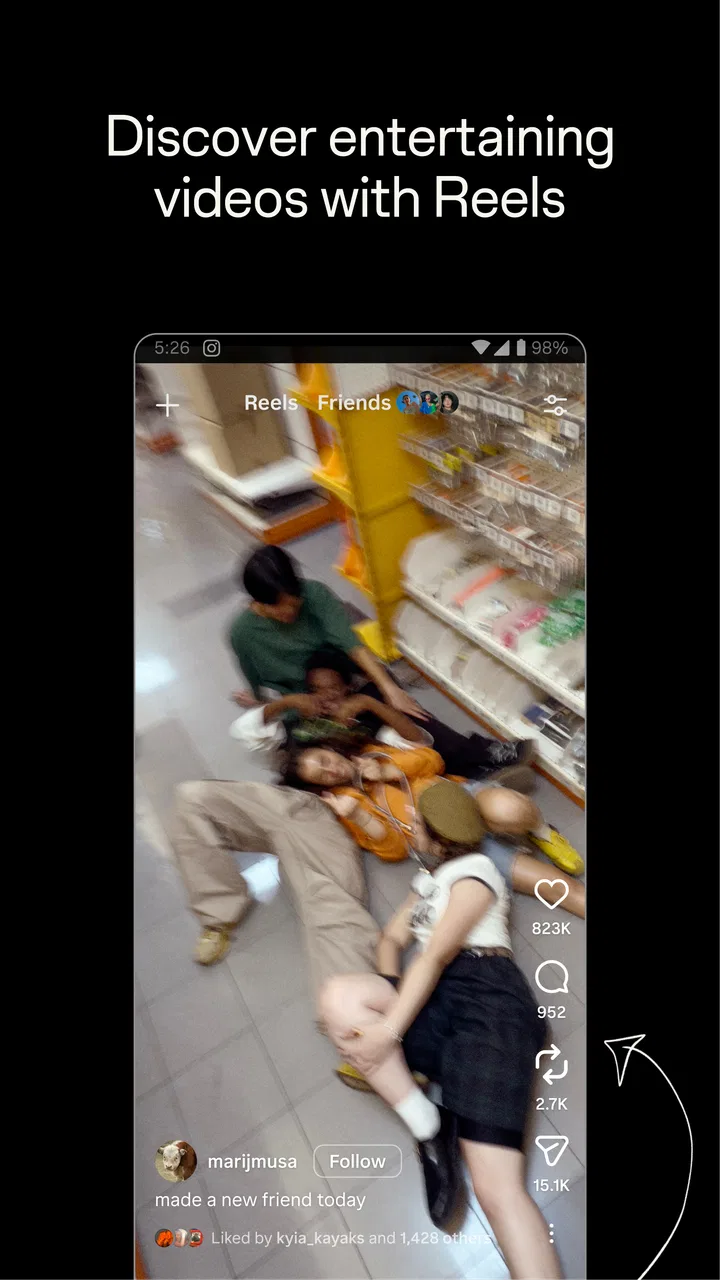
Reels are the strongest part of the app for rapid discovery. They are convenient when I have a few spare minutes and want entertainment or ideas, but they are also the feature most likely to turn a short visit into a long one. I avoid opening that area when I am trying to answer messages or publish something quickly. This is a small habit, yet it makes the app feel much more manageable.
Direct messages give Instagram a useful second role. I can send a post to a friend, continue a conversation, or react to something without leaving the same service. I would not choose it as my only communication tool for important or organized conversations, but for casual social contact the connection between public content and private chat is genuinely convenient.
Three Workflows That Make It More Useful
One workflow I recommend is separating creation from browsing. I prepare the photo or video I want to share before opening the app, publish it, check replies, and leave instead of starting with the discovery areas. This reduces the chance that a publishing task becomes an unplanned scrolling session. It also helps me judge the app as a communication tool rather than only as an entertainment feed.
A second workflow is using saved content as a temporary research shelf. When I find a recipe, location idea, design reference, or product suggestion, I save it rather than sending it immediately to myself in a message. Later, I review those saved items and remove the ones I no longer need. The benefit is not just organization; it prevents useful ideas from disappearing into a fast-moving feed.
A third is treating Stories as a conversation starter rather than a broadcast. A simple question, location update, or behind-the-scenes image can invite a much more natural reply than a carefully polished post. For close contacts, this can make the app feel personal. For a public audience, it is worth remembering that even casual posts can attract attention from people I do not know well.
You May Also Like

 AccuWeather: Weather Radar
AccuWeather Review: A Quick, Clear Forecast for Everyday Decisions
For everyday plans, the best forecast is the one you can understand quickly. AccuWeather makes rain timing, radar, and local conditions easy to act on, with a few trade-offs.

 Hill Climb Racing
Why Hill Climb Racing Still Turns Crashes Into One More Run
A tiny car, a bumpy hill and one more upgrade: Hill Climb Racing keeps resurfacing because its simple chaos makes every near-miss feel personal.

 AliExpress - Shopping App
AliExpress Makes Global Shopping Feel Personal, but Shoppers Bear the Risk
AliExpress turns a global marketplace into a pocket-sized discovery engine. Its reach is useful, its shopping loop compelling, and its trade-offs easy to miss.

 Lords Mobile: Kingdom Wars
Lords Mobile Is a Kingdom-Building Routine, Not a Quick Match
A case-by-case verdict on the building, battles, device demands, and social commitments that make Lords Mobile rewarding for some players and exhausting for others.

 PDF Scanner app - TapScanner
TapScanner Makes Paperwork Easier to Capture, Check, and Share
TapScanner makes scanning with a phone feel less like a rescue operation and more like a dependable step in getting work done. Its capture tools are useful, though not flawless.

 Block Blast!
Block Blast! Shows How Much a Puzzle Game Can Leave Out
A quiet grid game shows why puzzle players increasingly value instant clarity, repeatable skill and low-pressure play—and where the genre still needs to catch up.
More From Our News Desk
View All News


I also find it helpful to review who I follow whenever the feed stops feeling relevant. Removing inactive, repetitive, or stressful accounts changes the experience more than endlessly adjusting how I scroll. This is one of the less obvious strengths of Instagram: the quality of the app depends heavily on the small decisions I make about my social circle and discovery habits.
Where Instagram Wins Against Familiar Alternatives
Instagram wins when I want public visual sharing and private reactions in the same place. A traditional photo-focused network may feel calmer, while a messaging app may be better for direct conversation, but neither necessarily combines profile publishing, temporary updates, short-form video, discovery, and chat as smoothly. That connected structure is the reason I keep returning even when individual features compete with specialized services.
It is also strong for people who want to follow interests beyond their immediate friends. A small business can show new work, a creator can publish frequent updates, and a hobbyist can build a visual record without needing a separate website. I would not assume that every account needs a large audience; the tools can still work for a private circle or a small interest group.
The app is particularly convenient for an everyday scenario such as planning a weekend outing. I might see a location in a Reel, send it to a friend through a message, check a profile for more context, and later share a Story from the visit. That chain feels more natural than moving between a video platform, a photo service, and a separate chat application. The trade-off is that the same convenience keeps me inside one busy ecosystem.
Its huge user base is another practical advantage. When I want to find an acquaintance, check whether a local place has recent activity, or share something that friends are likely to see, Instagram is often a reasonable first choice. The benefit is strongest when the people I care about already use it. A technically polished social network is not useful for my circle if nobody I know checks it.
Where Another Kind of App May Fit Better
I would choose a messaging-first service over Instagram when privacy, simplicity, or focused conversation matters more than public discovery. Instagram messages are convenient for casual exchanges, but the surrounding feed and media stream can make the experience feel less deliberate. For family coordination, work discussions, or conversations that need clear organization, a dedicated messenger may be easier to manage.
A photo archive or cloud gallery is a better choice when my main goal is preserving memories rather than presenting them socially. Instagram encourages selection, editing, and audience awareness. That is useful for sharing, but it is not the same as maintaining a complete personal library. I keep important originals elsewhere and treat Instagram as a publishing layer, not as my only backup.
For long-form video, detailed tutorials, or extended discussions, I usually prefer a service designed around those formats. Reels are effective for quick ideas and entertainment, but short clips can leave out the context I need. Likewise, people who dislike algorithmic discovery may prefer a chronological network or a smaller community with a narrower purpose.
There is also a real audience-fit issue. If you mainly want text updates, technical discussion, or anonymous participation, Instagram’s emphasis on images, video, profiles, and personal presentation may feel restrictive. I would skip it if the visual format makes you uncomfortable or if the pressure to maintain an attractive public presence outweighs the social benefit.
Privacy, Attention, and Everyday Friction
The most important limitation in my experience is attention management. The app makes it easy to move from a message to a Story, from a Story to a profile, and from a profile to Reels. That flow is smooth by design, but smooth is not always good. I recommend turning the app into a tool with boundaries: decide what you want to do before opening it, avoid browsing when tired, and review your following list instead of accepting every suggested account.
There is also a difference between controlling your audience and controlling the overall experience. A private account can make sharing feel more selective, but it does not remove the visual pressure or the temptation to compare your life with polished posts. I am more comfortable using Instagram when I remember that a profile is a chosen presentation, not a neutral diary.
Moderation and social friction are other reasons to be selective. Comments, messages, and recommendations can bring useful interaction, but they can also introduce unwanted contact or content. I would spend time adjusting audience and interaction controls before posting regularly, especially for a teenager or anyone who wants a quieter experience. The Teen rating is a useful signal that the app is not intended for very young children.
Storage and data use can matter too, particularly if I watch a lot of video or keep returning to media-heavy sections. I avoid treating the app as an always-on background activity and use device settings to keep an eye on its impact. The exact experience depends on the phone and connection, but the principle is consistent: video-heavy social apps deserve more attention than a simple text messenger.
What the Free Price Really Means
Instagram is free to download and use, which makes trying it straightforward. The app also includes optional in-app purchases ranging from nineteen cents to ten thousand dollars per item. That wide range means I would not assume every visible promotion or paid interaction is relevant to ordinary social use. I would review any purchase carefully, particularly on a shared device or a child’s account.
For most people, the main cost is not the download price. It is time, attention, and the effort of maintaining an account. Posting regularly, responding to messages, filtering unwanted content, and keeping a comfortable audience all require ongoing involvement. If I only want occasional photo sharing, a simpler service may demand less maintenance.
Switching away can also have a social cost. Before deleting an account or abandoning it, I would tell close contacts where to reach me, save personal copies of important media, and check which conversations or communities exist only there. The more my friends rely on Stories and direct messages, the more inconvenient a complete move becomes. Keeping the account for occasional contact while using another app for daily communication can be a sensible middle ground.
On the other hand, switching into Instagram is relatively easy when my friends, favorite creators, or local businesses already use it. I can begin with a small following instead of trying to understand every feature at once. My advice is to follow only people and topics I genuinely want, then add more gradually. A clean starting feed is much easier to evaluate than one filled with every recommendation offered during setup.
My Recommendation for Different Types of Users
I recommend Instagram to people who enjoy visual communication, want to discover new accounts, and like the convenience of moving from a public post to a private conversation. It is especially suitable for friends who share photos casually, creators building a visual presence, small businesses showing their work, and anyone who wants quick inspiration across many interests.
I recommend it with limits for people who are easily drawn into endless scrolling. Use it for a defined purpose, keep the following list intentional, and do not mistake the feed for a complete picture of your social life. The app becomes much better when I control the relationship instead of letting its recommendations decide every visit.
I would skip it as a primary platform if I want a quiet archive, a text-centered community, highly organized communication, or minimal exposure to public social signals. In those cases, a dedicated gallery, messenger, forum, or smaller network may be a better fit. Instagram can still be useful as a secondary account, but it should not be treated as the answer to every social need.
My final view is that Instagram is most valuable when I use its connected tools deliberately. The feed and Reels provide discovery, Stories make casual sharing easy, profiles give visual context, and messages keep conversations close to the content that started them. That combination explains its lasting appeal, while the same design creates its biggest weakness: it asks for more attention than a single-purpose app. If you want a broad visual social space and are willing to set your own boundaries, I think it is worth trying. If you want calm, privacy-first communication or a dependable personal archive, I would choose a more focused alternative instead.
FAQs for Instagram
01What are the main features of Instagram?
Instagram is a social media platform primarily focused on photo and video sharing. Key features include Stories, Reels, IGTV, and direct messaging. Users can also explore content through hashtags and location tags. The platform provides various filters and editing tools to enhance posts and allows for live streaming.
02Is Instagram free to use, and are there any in-app purchases?
Instagram is free to download and use. However, it offers in-app purchases, such as promotional tools for businesses and creators looking to boost their posts or reach a wider audience. Additionally, some creators or businesses might offer exclusive content through subscriptions.
03How does Instagram handle privacy and security?
Instagram offers several privacy and security features. Users can set their profiles to private, control who can comment on their posts, and block or report unwanted interactions. Two-factor authentication adds an extra layer of security, and account activity can be monitored for any unauthorized access.
04Can Instagram be used for business purposes?
Yes, Instagram is widely used for business. It provides tools like Instagram Business Profiles, which offer insights into followers and post performance. Businesses can create ads, sell products directly through the app, and utilize Instagram Shopping to showcase their offerings, making it a valuable platform for marketing.
05What are Instagram Stories and how do they work?
Instagram Stories are ephemeral posts that disappear after 24 hours. They can include photos, videos, text, and interactive elements like polls and questions. Stories appear at the top of the user's feed and are a popular way to share moments, updates, and engage with followers in a more casual, temporary format.
Pros
- User-friendly interface with smooth navigation.
- Extensive filters and editing tools for photos.
- Large
- engaging community for interactions.
- Seamless integration with other social media.
- Frequent updates with new features.
Cons
- Can consume a lot of mobile data quickly.
- Ads can interrupt the user experience.
- Algorithm changes affect content visibility.
- Privacy concerns with data sharing.
- Addictive nature may lead to overuse.

Gallery